Link insertion (also called niche edit) is an SEO tactic where you get your link added to an article that's already published on another website. It's used to earn contextual backlinks from pages that already have rankings, traffic, and authority.
In this guide, we’ll dive deeper into how link insertion actually works, what benefits it offers, and how you can do it properly.
Key takeaways
Link insertion is the process of adding your link to an existing article on another website.
Link insertion differs from guest posting and broken link building because you add a link to an already-published page rather than creating a new article or replacing a dead link.
The most effective opportunities are adjacent articles where your content fills a genuine information gap.
Paragraph insertions can make pitches more compelling because you give the editor ready-to-use copy that adds value for their readers.
A good link insertion pitch should identify the exact placement, suggested text, and value of the addition.
Link insertion can save time compared with guest posting, but forced or low-quality placements can create SEO risks.
How does link insertion work?
Link insertion works by finding a published article, then asking the author to include a link to your page.
A typical link insertion campaign follows these steps:
Choose a page on your site that deserves more links, such as an in-depth guide or an original data piece.
Find published articles on other sites that cover a related topic.
Spot a gap in each article that your page fills.
Pitch the editor or writer with the exact spot and the text to add.
Once they update the article, check that the link is live and points to the right URL.
What are the main types of link insertion?
Link insertions come in three main forms, and each one asks a different amount of the editor.
Single-link insertion
A single-link insertion adds a hyperlink to text that already exists in the article. You suggest an anchor phrase that’s relevant to your page, and the editor turns it into a link.
It's a small task, so it's quick to approve when the fit is obvious. The trade-off is that the existing sentence has to support your link.
If the wording doesn't match your page closely, the link reads as forced, and editors tend to ignore the request. Single-link insertions work best when the article already mentions a statistic, definition, brand, or tool without citing a source.
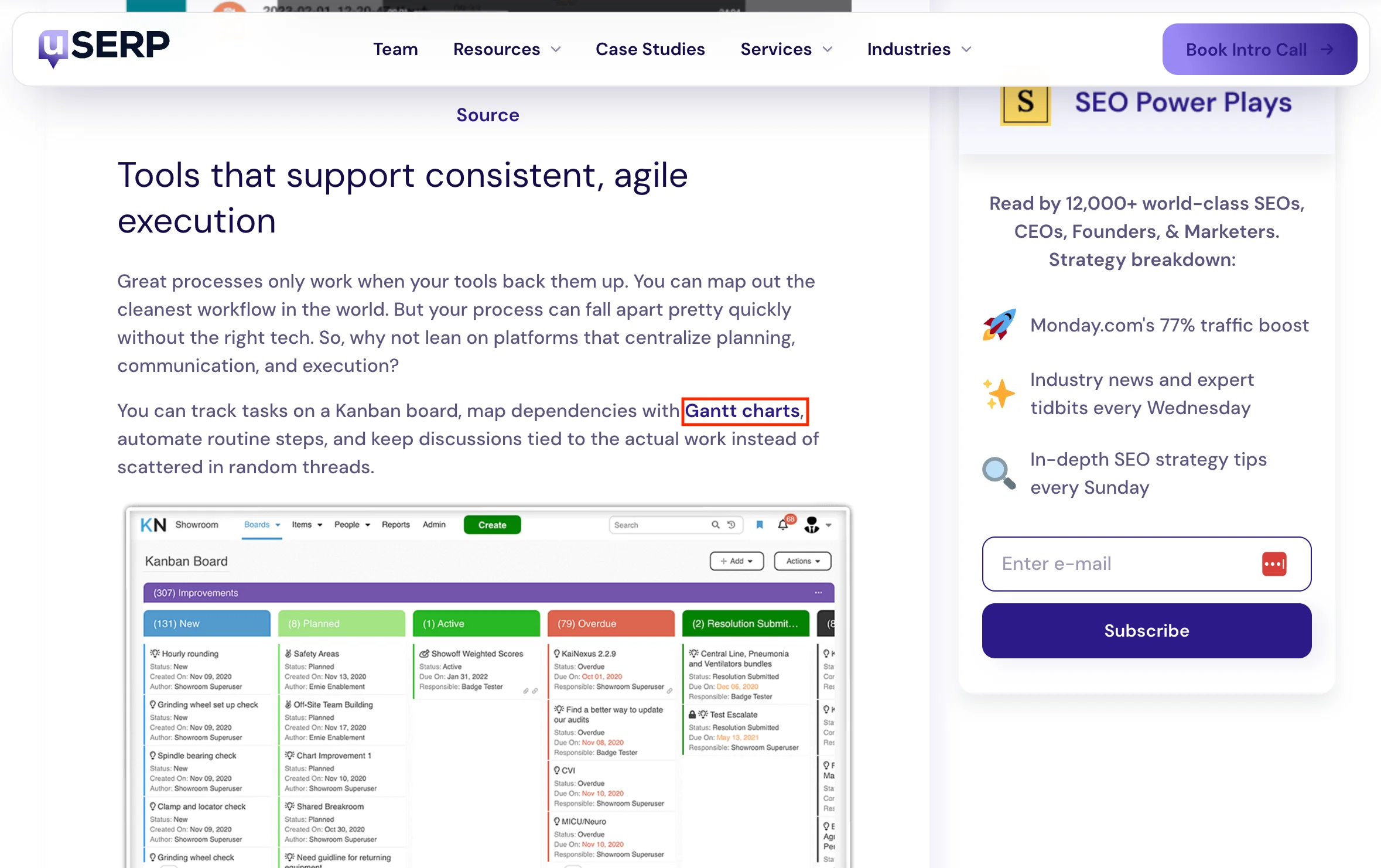
Here’s an example of a link insertion our team at Position Digital secured for Resource Guru. Since the article already talks about Gantt charts, we simply asked the author to link that term to Resource Guru’s Gantt charts product page.
Paragraph insertion
A paragraph insertion adds a short, ready-written passage to the article, with your link inside it. The passage covers a point the article misses, so the editor gets a content update as well as a link.
Position Digital's outreach team, which runs its campaigns in ListBrew, favors this format. Jelo Guia, SEO Outreach Manager at Position Digital, said:
"We do link insertion and paragraph insertion, although we tend to prefer paragraph insertion because we have more control over the text. We can make sure the surrounding text matches the anchor text."
Keep the paragraph to two to four sentences and match the article's tone. The more it reads like the original author wrote it, the easier it is to say yes.
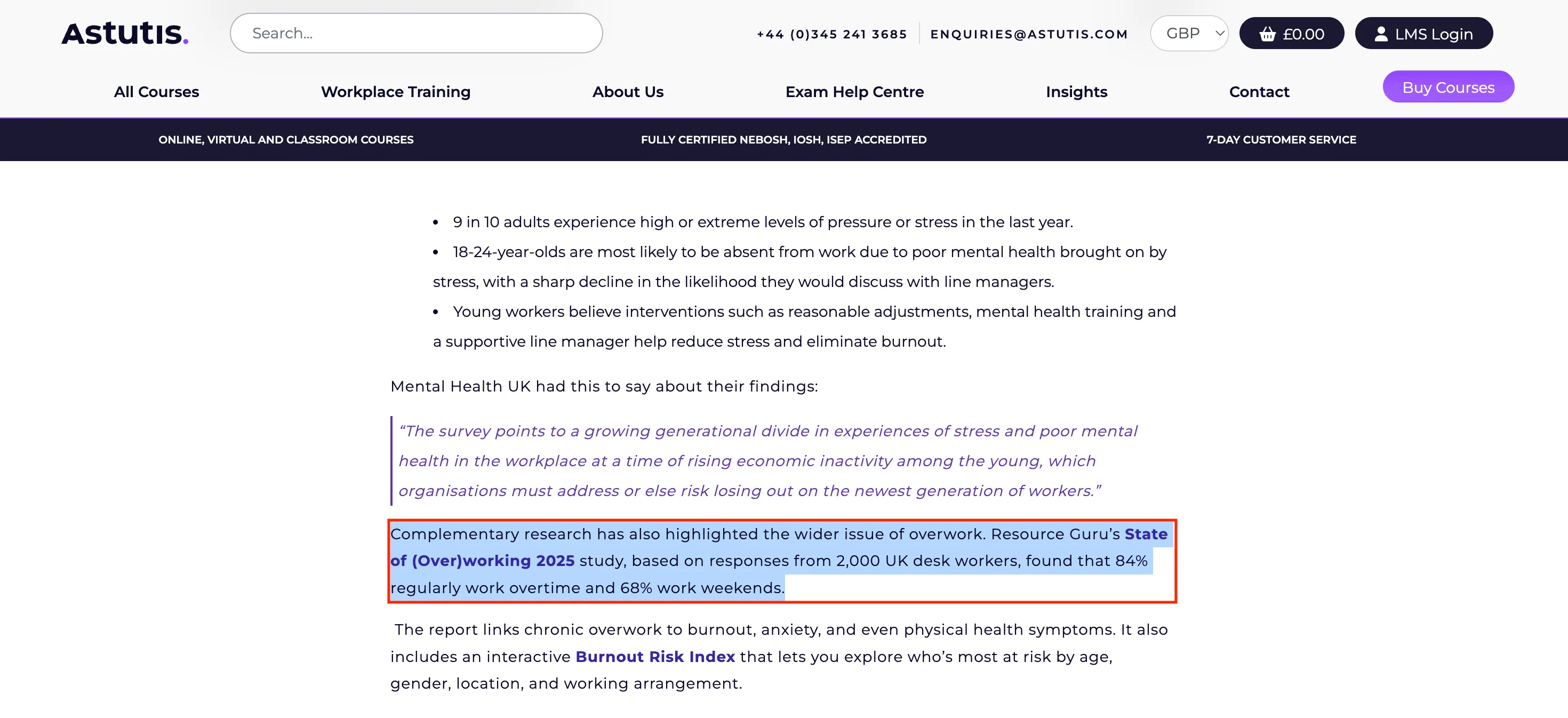
This is another example from Resource Guru, where we insert a relevant paragraph about Resource Guru’s study in a complimentary research article.
Resource list and roundup insertion
A resource list or roundup insertion adds your product or brand to an existing list, such as "best tools for X" or "best agencies for Z". The editor adds one entry, often with a short description you supply.
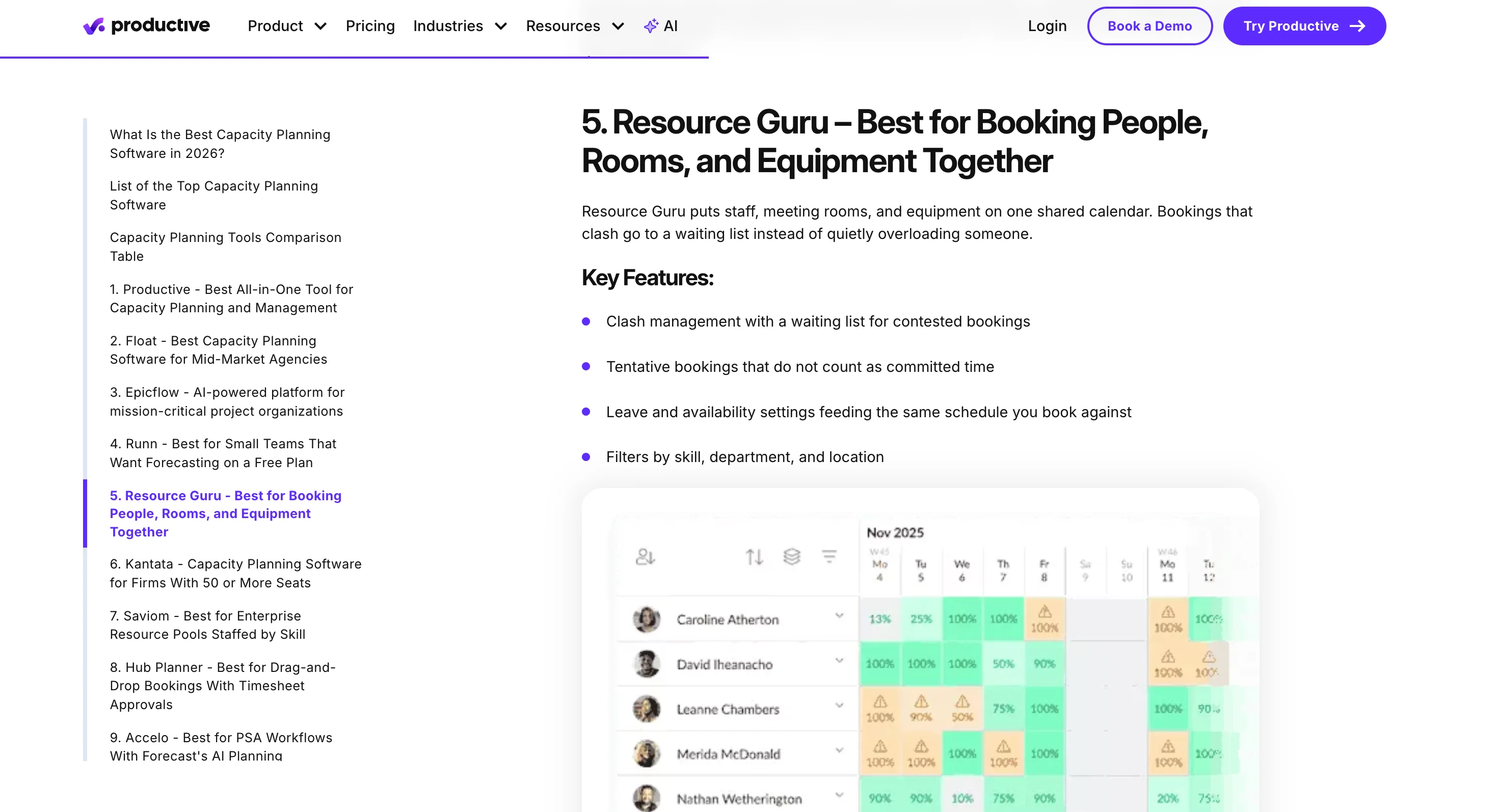
Here’s an example of a listicle placement we managed to secure for Resource Guru.
These lists are easier to pitch because adding entries is a normal part of keeping them current. Roundups that rank for "best" queries can also send readers who are ready to buy straight to your site.
For the complete steps on how it works, read our guide to listicle outreach.
Link insertion vs. guest posting vs. broken link building
Link insertion differs from guest posting because you edit an existing page instead of writing a new one, and from broken link building because you don't need a dead link to replace:
Link insertion | Guest posting | Broken link building | |
|---|---|---|---|
What you create | A link or short paragraph | A full article | A page that replaces a dead resource |
Page the link sits on | An established, indexed page | A new page | An established, indexed page |
Control over context | Low to medium; the editor decides | High; you write the copy | Low; the dead link sets the context |
Effort per link | Low | High | Depends (High if you create a new page; Low if you have an existing page) |
Works best when | Your page fills a gap in someone else's article | You want a byline and control over the topic | Your page matches a resource that's gone |
If you prefer guest posting over link insertions, our guide to guest post outreach walks you through the process.
What are the benefits and risks of link insertion?
Link insertion offers tons of benefits, which is why it’s used by 42% of SEO professionals, with 14% calling it their best-performing tactic.
That being said, there are also some risks that you need to be aware of.
Benefits of link insertion
Established authority. When you get a link from a high-authority page, that authority will be passed on to your page.
Faster to go live. The page is already published and indexed, so there's no writing or publishing queue.
Less work per link. You write a sentence or a paragraph, not a full article.
Referral traffic potential. If the link sits inside a page with tons of traffic, it can send referral traffic from readers who are already interested in the topic.
Access to sites that don't take guest posts. Plenty of publishers turn down contributed articles but will update one that's missing something.
Cheapest link to buy. According to our link building statistics, buying link insertions is cheaper than guest posts, listicle placements, and press coverage.
Risks of link insertion
Forced placements. Adding an anchor text or a link that doesn't match the context of the paragraph can look spammy and give readers no reason to click.
Low-quality marketplace sites. Buying from a link marketplace often means buying from sites with little real traffic. In the database BuzzStream analyzed in 2026, 97.5% of sites selling insertions are low quality, with a DR lower than 40 and traffic lower than 10-40k per month.
Who is link insertion best for?
Link insertion is best for teams that already have strong articles worth linking to. That covers most of the people who run link building day to day:
SEO agencies and freelance link builders with client blogs full of guides and data pieces.
In-house link builders at brands whose blogs already rank. Every new article becomes a reason to pitch.
Link insertion is a harder sell for new sites with thin content, where guest posting builds a base faster.
How to run a link insertion campaign
Here’s how you can build backlinks to your website using link insertions:
1. Decide which on-site content you want to build links to
Start by choosing the pages on your website that you want to build backlinks to.
Ideally, these should be pages that are already useful and relevant to your target audience, such as in-depth guides, original research, templates, or other link-worthy resources.
Once you’ve chosen your target pages, identify the topics and keywords they cover. This will help you find relevant articles where a link to your content would make sense.
2. Find adjacent articles to pitch
Once you’ve chosen the page you want to build links to, look for articles that cover related topics, rather than the exact same topic.
Jelo explains why:
“We won't be reaching out to prospects who have written the same article, because they wouldn't have an additional incentive or a reason why they should be linking to us.”
The goal is to find adjacent content where your article could add useful information or provide additional context.
For example, if you have an on-site article on “Guest Post Outreach Examples”, you could look for articles covering related topics such as:
How to run a guest post outreach campaign
Guest post outreach best practices
These topics are closely related to your resource, but they don't directly compete with it. This gives you a clearer reason to suggest your content as an additional resource.
How to find adjacent articles in ListBrew
First, you need to create a new campaign and choose Link Insertion as your campaign type.
Then, add the page you want to build links to and add some context of what the page is about. You can also ask ListBrew to read the page and it will suggest several angles to target.
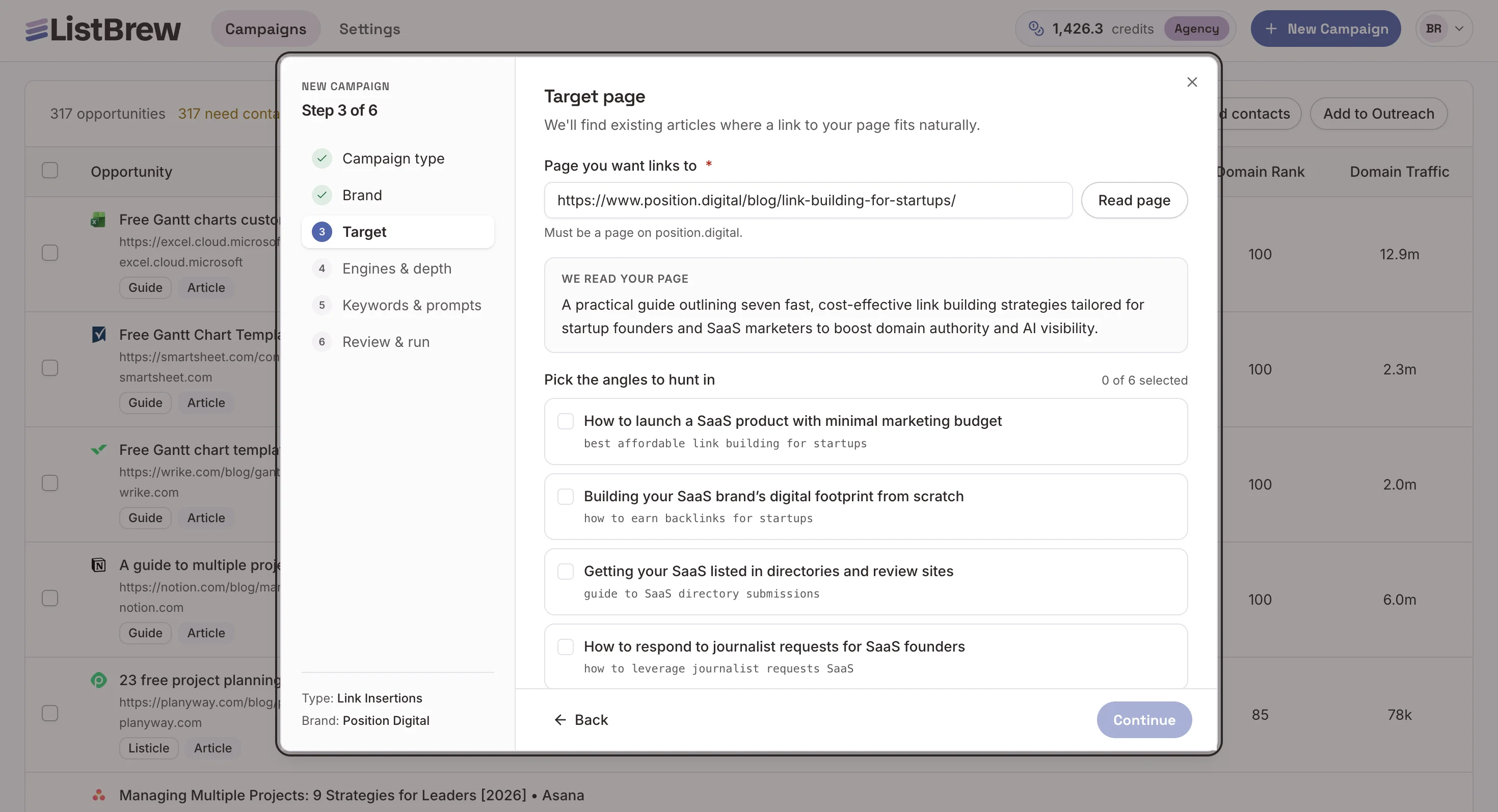
Follow the rest of the steps, and ListBrew will then find existing articles where a link to your page fits naturally.
Review the results ListBrew shows, then filter by domain authority, traffic, Google rankings, or AI visibility to prioritize opportunities with the highest impact.
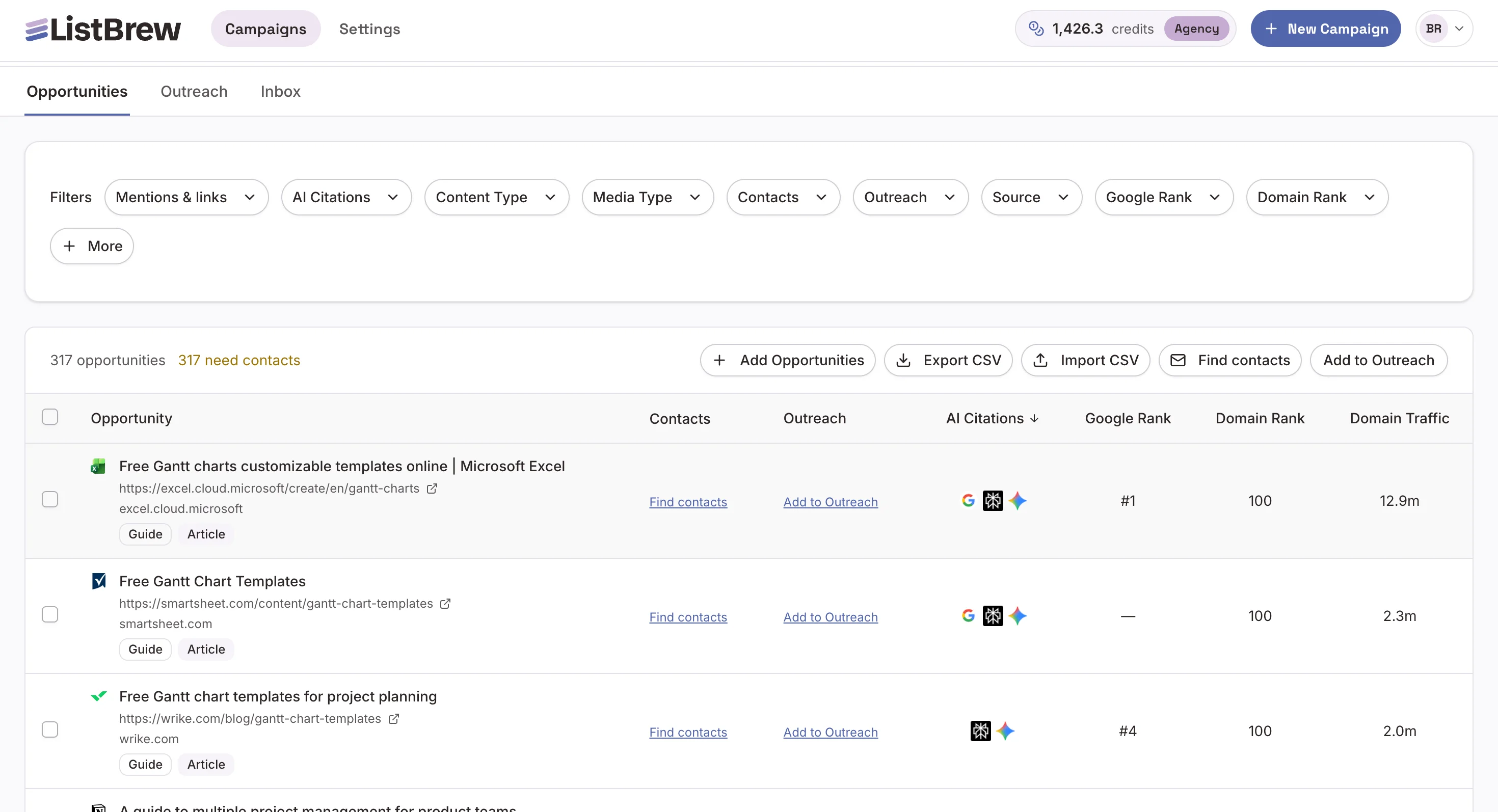
3. Find the right contacts
The right contact is the person who can edit the article: usually its writer, the blog's editor or a content manager. If nobody in a content role is listed, find the domain’s generic email address (hello@domain.com) as a last resort.
How to find contacts in ListBrew
Inside ListBrew’s dashboard, click the Find contacts button at the top of the results.
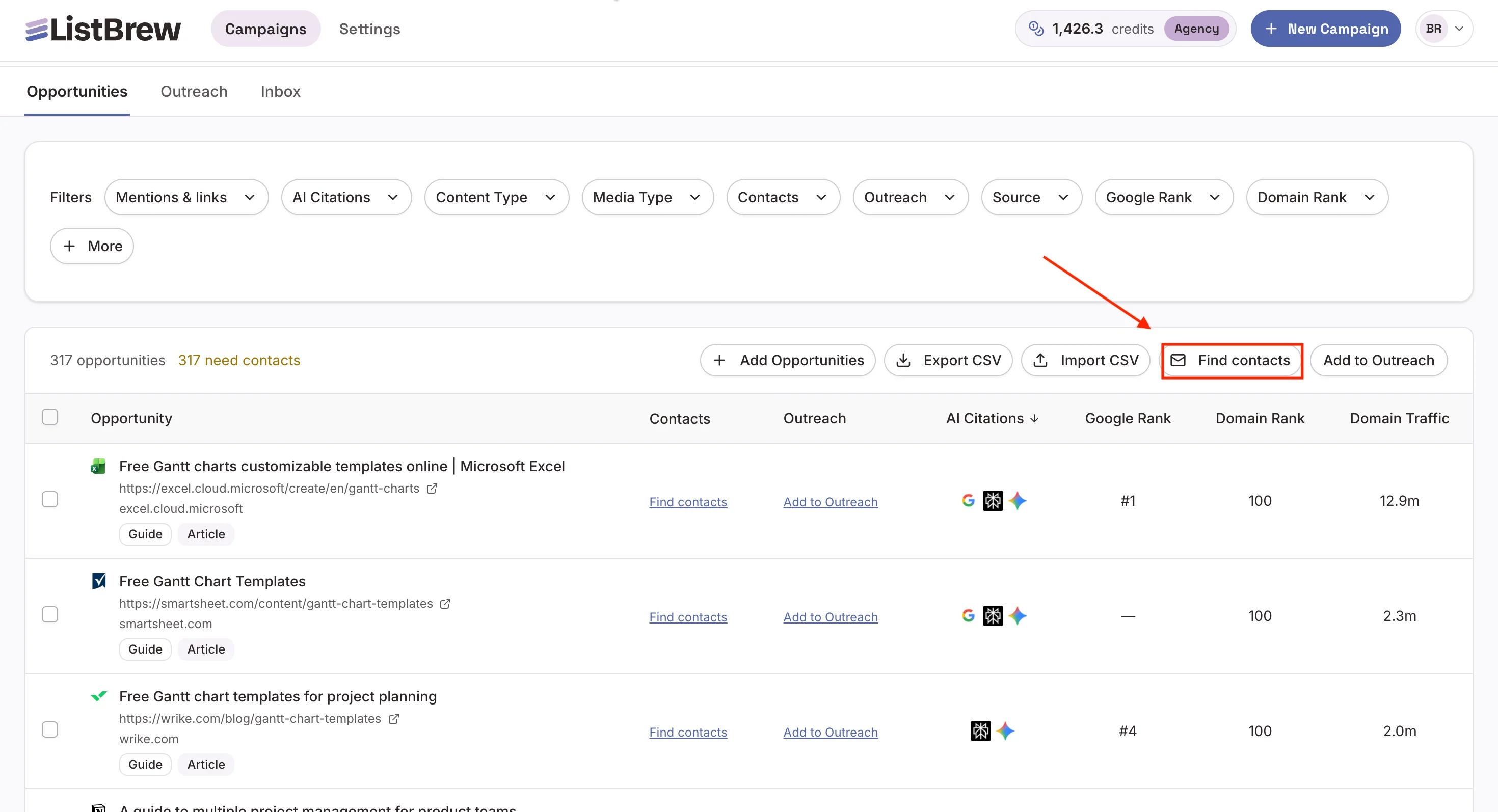
Choose People by role and enter the roles you want to reach out, such as: content writer, author, content editor, content manager, content marketing specialist, etc.
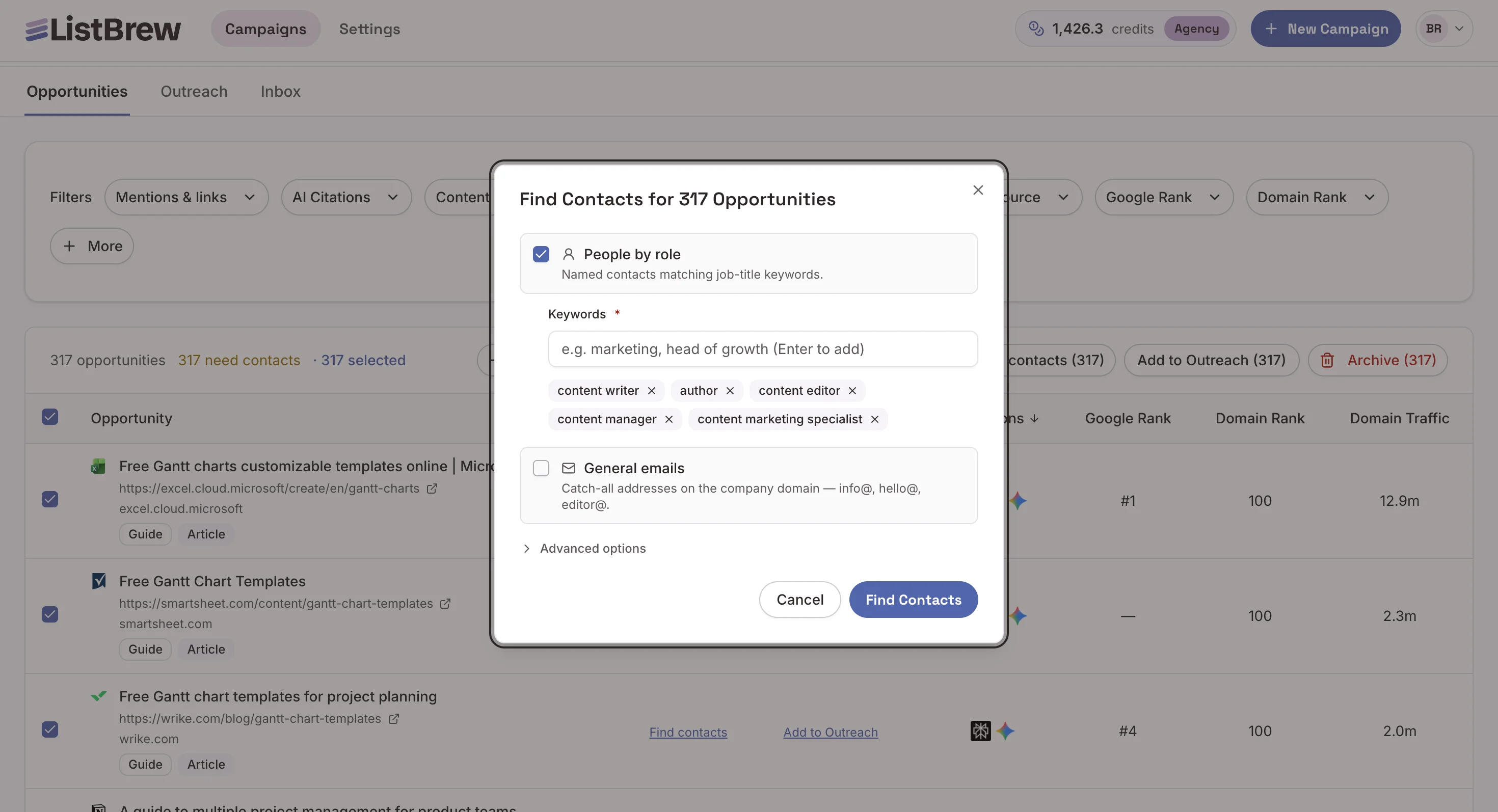
Click Find Contacts and wait a few minutes as ListBrew populates the contact details of each opportunity.
4. Write and send personalized pitches
A good link insertion pitch should make it easy for the prospect to understand what you want to add, where it should go, and why it would improve their article.
As Jelo said:
"We already tell the prospect where specifically in their article we can insert our entry."
When writing your pitch, include:
The article: Mention the specific page you’re referring to.
The placement: Point out the exact section, paragraph, or sentence where your link could be added.
The suggested text: Write the sentence or short passage you’d like them to add rather than asking them to figure it out themselves.
The value: Explain how the addition would help their readers, such as answering a question the article currently skips or providing more detail on a related topic.
For example:
Hi {{firstName}},
I was reading your article on {{article topic}} and noticed that the section on {{section}} briefly mentions {{topic}} but doesn't go into much detail.
We have a guide that covers this in more depth, so I thought it could be a useful addition for your readers.
Would you be open to adding this sentence after {{specific sentence}}?
“{{suggested sentence with link}}”
It would give readers a more detailed explanation of {{topic}} without disrupting the flow of the article.
Thanks,
{{name}}
Keep your pitches specific and concise. Avoid generic messages that simply ask whether the prospect accepts link insertions.
The more clearly you identify the opportunity and explain the value, the less work the prospect has to do to evaluate your suggestion.
How to send the pitch from ListBrew
Select all the opportunities that have contacts, and click Add to Outreach.
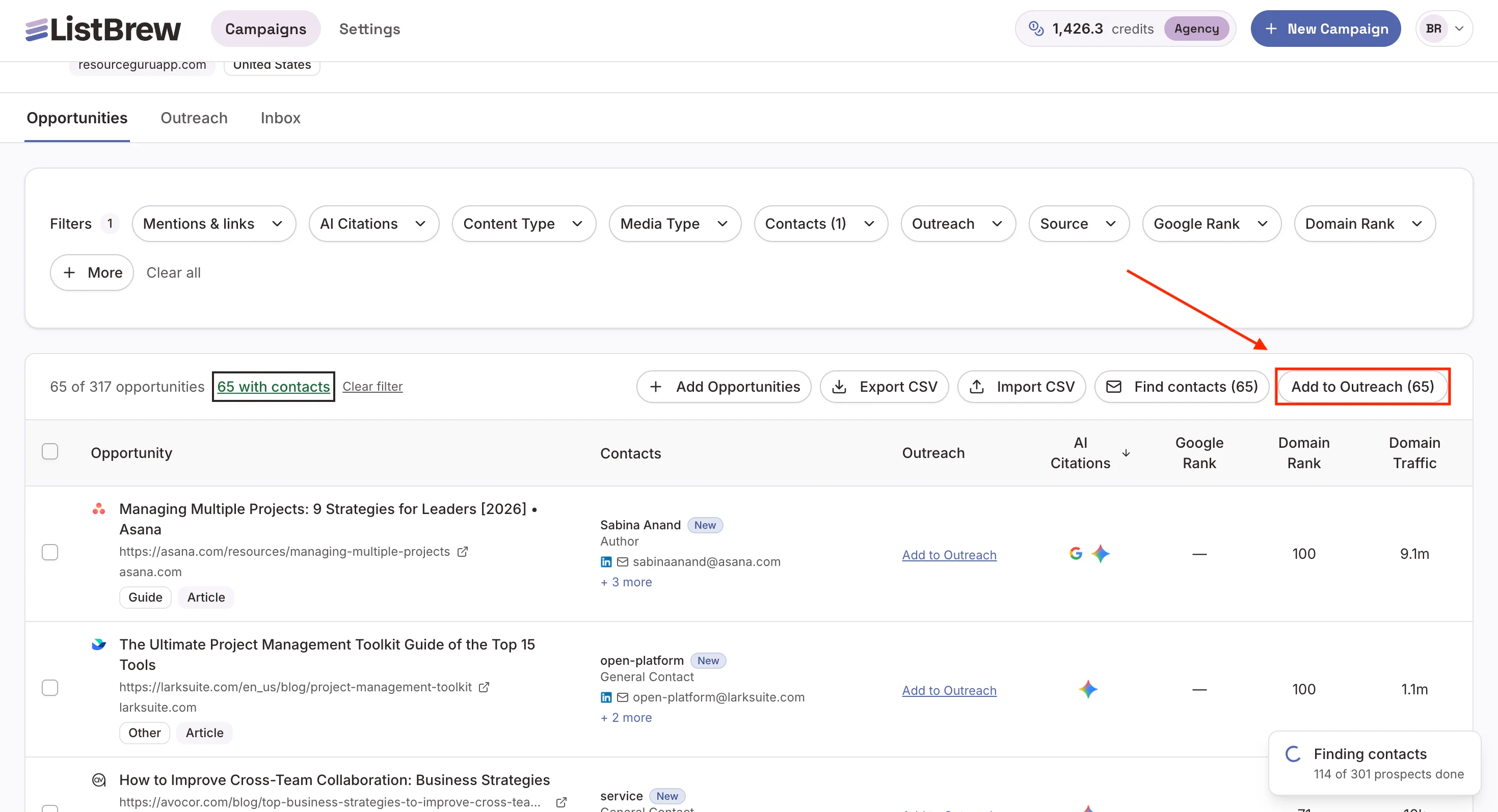
Enter a new sequence name, open the Outreach tab, and click the sequence you’ve just created.
From there, you can:
Choose the opportunities you want to contact
Create a personalized pitch with the help of AI
Set up your email sequences: initial email and follow-ups
Add your sender email address and customize the settings (sending schedule, email signature, sending limits, etc)
Monitor replies and track your email performance
Launch your link insertion campaign with ListBrew
Link insertion works when you pitch the right article, with the right placement, to the right person.
ListBrew handles all three steps in one place. It finds adjacent articles where your page fills a real gap, pulls the editor's contact details, and then helps you write personalized pitches in one place.
Create your free ListBrew account and start building your next link insertion campaign today!
Link insertion FAQ
Are niche edits and link placements the same as link insertion?
Niche edits and link placements describe the same mechanic as link insertion: a link added to an existing article. The difference is usage. Vendors and marketplaces tend to use "niche edit" and "link placement" for insertions they sell, while "link insertion" also covers links earned through outreach.
Is link insertion illegal?
Link insertion isn't illegal, but links bought or traded to manipulate rankings break Google's spam policies, and sites that violate them "may rank lower in results or not appear in results at all." Human review can also lead to a manual action against the site.
How much does a link insertion cost?
A link insertion costs nothing in fees when you earn it through outreach; you pay in time and tools. If you buy paid link insertions from marketplace sites, it typically costs $179 on average, according to BuzzStream's report.