Finding websites for link insertion is easy. There are plenty of domains that sell link insertion placements in marketplaces and similar lists. The problem is, those links are mostly low quality.
BuzzStream's 2026 link insertion cost study found that 97.5% of link insertion sites in a major marketplace database have a low DR, little traffic or both.
That's why, in our experience, manual outreach is still the best way to secure a high-quality link insertion. You pick the page, check that it ranks and gets traffic, then ask the editor to add your link because it improves the article. A marketplace list only tells you that a seller offers the page.
This guide ranks seven sources of link insertion sites (the host pages for niche edits) by how much you can verify before you pitch. It also covers what Google says about paid insertions, four checks for any candidate page, and the steps to run the outreach in ListBrew.
Key takeaways
In our experience, the strongest link insertion sites already rank for an adjacent keyword or get cited by AI engines, so their visibility is proven before you pitch.
Pages linking to top-ranking articles, competitor backlink gaps, and broken links are also good sources, once you apply each source's filter.
Avoid marketplaces if you can, because their sites are usually low quality. Google's spam policies also class buying links for ranking purposes as link spam unless the link carries rel="sponsored" or rel="nofollow".
Where can you find websites for link insertion?
You can find websites for link insertion in seven places, ranked here from most to least verifiable in our experience. Start with pages ranking for adjacent keywords and pages AI engines already cite, then work through referring pages, competitor gaps, search operators, broken links, and finally marketplaces.
Source | Why it's a good source | Main filter |
|---|---|---|
1. Pages that rank for adjacent keywords | It already ranks in Google for an adjacent term, so the page has proven visibility | Positions 1 to 10 |
2. Pages AI engines already cite | LLMs already cite it, so getting your brand featured there can boost your AI visibility | The page keeps getting cited across several runs |
3. Pages linking to top-ranking articles | It's already topically relevant, because it links to a top-ranking article on your topic | Adjacent pages only, minus blacklisted, won or recently contacted domains |
4. Competitor backlink gaps | The domain links to your competitors but not to you | Find the exact linking page and keep adjacent topics only |
5. Google search operators | It's indexed and already covers your topic | Phrase in the body, not the title |
6. Broken links | A dead link on the page is a natural opening to offer your content as the replacement | The page is still maintained |
7. Marketplaces and sold lists | They're easy to find, but they're not the highest quality | Avoid pay-to-play and "Write for Us" pages |
What does Google say about paying for link insertions?
Google Search Central's spam policies list "Buying or selling links for ranking purposes" as link spam, and paying for a link insertion falls under that heading. Paid links are allowed "as long as they are qualified" with a rel="nofollow" or rel="sponsored" attribute, so a bought insertion that passes ranking value breaks the policy.
We don't recommend undisclosed paid placements, so the sources below focus on links you earn by giving a host page something useful.
How to find link insertion opportunities
To find link insertion opportunities, start from pages with proof of visibility, such as pages ranking for adjacent keywords or cited by AI engines. Then widen to referring pages, competitor gaps, search operators and broken links. Apply each source's filter at discovery, and run every survivor through the same four checks.
Our roundup of the best link prospecting tools compares the software that speeds this up.
1. Pages that rank for adjacent keywords
Pages already ranking for keywords related to your topic are the best targets for link insertion, because the ranking itself proves the page has visibility. Our outreach team starts from the article it wants links to and takes that article's topic as the keyword. Jelo Guia, SEO Outreach Manager at Position Digital, explained how they search from there:
We do keyword research to find articles that are adjacent to the topic that we'll be using for the link insertion. For example, if we have an on-site article related to 'SaaS marketing guide', then we use that keyword to look for adjacent articles, such as 'SaaS SEO' or 'SaaS content marketing'.
For the filter, look for articles ranking in positions 5 to 15, because owners are often eager to improve those pages. In our experience, that band finds visible pages whose owners want to improve them.
2. Pages AI engines already cite
Pages that LLMs already cite are also valuable because getting your brand featured there can boost your AI visibility. To find them, run deep-research prompts for your target keywords in ChatGPT, Claude, Perplexity or Gemini, export every cited URL, then check each domain's organic traffic.
Run your prompts several times, because AI shows slightly different citations for each run. Our AI Overview citation study found that Google changed at least one citation for 52% of keywords on identical repeat searches. If a page keeps appearing after multiple runs, then it's a strong outreach candidate.
3. Pages linking to top-ranking articles
Another way to find topically relevant prospects is to look at the top ranking pages' referring domains. You can use tools like Ahrefs or Semrush for this. Our team at Position Digital builds prospect sheets this way: Take the articles ranking for a client's topic, export the pages linking to them, then remove domains that are blacklisted, already won or recently contacted.
4. Competitor backlink gaps
Competitor backlink gaps show domains that link to your competitors but not to you. Ahrefs' Link Intersect finds these sites for up to 10 competitor domains or pages, and Semrush's Backlink Gap tool does a similar job.
A gap is domain-level proof, because Ahrefs exports the referring domains and each domain's backlinks. For the filter, open those backlinks, find the exact page that links to a competitor, and keep it only if its topic is adjacent to yours.
5. Google search operators
Google search operators surface pages that are indexed and on topic, though they say nothing about traffic. These are the link insertion search strings we'd start with:
[category] intitle:roundup OR intitle:best OR intitle:topfinds roundups."keyword" inurl:blogfinds blog posts that mention your keyword.site:targetdomain.com "your keyword"searches one site for the best page to pitch.keyword inurl:linksandkeyword "useful resources"surface resource pages.inurl:blog intext:"[phrase]" -intitle:"[word]"returns pages that mention a phrase in the body but not in the title.
Our filter for every string is the same: The phrase should sit in the body, not the title. In our experience, a page that touches on your topic but doesn't cover it in depth has a gap your page can fill.
For roundups, our guide to listicle outreach covers how to earn a spot on the list itself.
6. Broken links
Broken links are a natural way in, because a dead outbound link leaves a gap on the page that your content can fill. Find the pages first, then offer one of your own as the replacement.
Ahrefs' Content Explorer guide shows how to search a topic and filter for broken pages. Check My Links finds the broken links on a page you're already reviewing, and the Wayback Machine shows what the dead page used to say, so you can check that your content is a good match.
Keep a page only if it's still maintained. A page full of dead links may have nobody left to update it.
7. Marketplaces and sold lists
Marketplaces such as Adsy sell access to lists of sites that accept link insertions. This can be an option if you have the budget but don't have the time to do manual outreach.
However, BuzzStream's 2026 link insertion cost study found that most of those sellers fall in the Low Quality tier, which covers every site outside Top (DR 81+ and 100k+ traffic), High (DR 71 to 80 and 50k+) and Mid (DR 40 to 70 and 10k to 49k).
For that reason, we suggest avoiding marketplaces if you can and using the six sources above instead.
The Host Page Filter: Four checks before you pitch
The Host Page Filter is the set of four checks to run on every candidate page, from any of the seven sources, before anyone writes a pitch. You feed in the candidate URL plus your target page and its keyword, and you end with a keep-or-drop shortlist of link insertion sites worth pitching.
Work through the checks in this order, and drop a page at the first one it fails:
Does the page cover a topic relevant to your content? A relevant topic makes your link feel natural to the editor and useful to readers. Aim for adjacent topics where your content adds something the page is missing, because a page that already covers the same ground has little reason to link to you.
Does the page already have visibility? Look at its Google ranking, AI citations and traffic. A page that ranks, gets cited by AI engines or draws steady visits puts your link in front of real readers, which a page nobody visits can't do.
Does the page already have outbound links? Skip pages with no external links or that only give nofollow links. In our experience, pages that already link out editorially are more likely to accept another link.
Is the page regularly updated? Check when the page was last updated. A page nobody has touched in years often has no one left to make the change.
How to run successful link insertion campaigns with ListBrew
Here's how to find the right link insertion prospects and send personalized pitches using ListBrew:
Step 1: Decide which onsite content to build links to
Choose the page you want links to first. It must be an important page on your own site, one you're trying to rank for, such as an in-depth guide, original research or a template that readers would want to link to.
Position Digital's outreach team only builds links to pages on the client's own blog:
We only do link insertions for articles that have been written and published on the client's blog. We don't do link insertions outside of those articles.
Christine Altiche, SEO Specialist at Position Digital, explained how the team decides which pages to focus on each month:
We have certain themes, based on our services, for each month. So our campaigns are based on the specific theme for that particular month.
Step 2: Find link insertion opportunities
Inside the ListBrew dashboard, navigate to Opportunities, go to the Link insertions tab, and click Find opportunities.
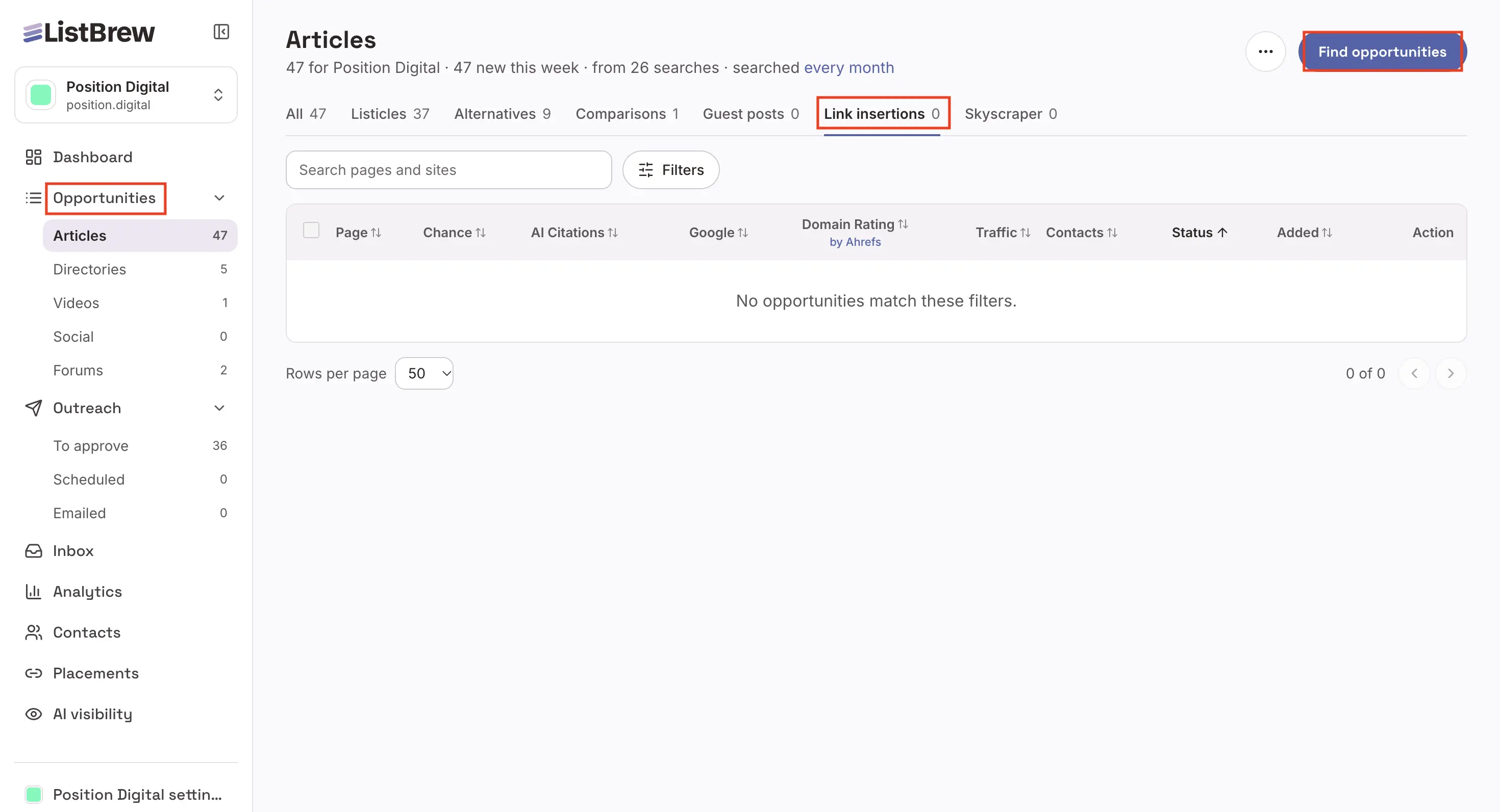
You can then either set up the campaign yourself, or let ListBrew's AI do the whole thing for you.
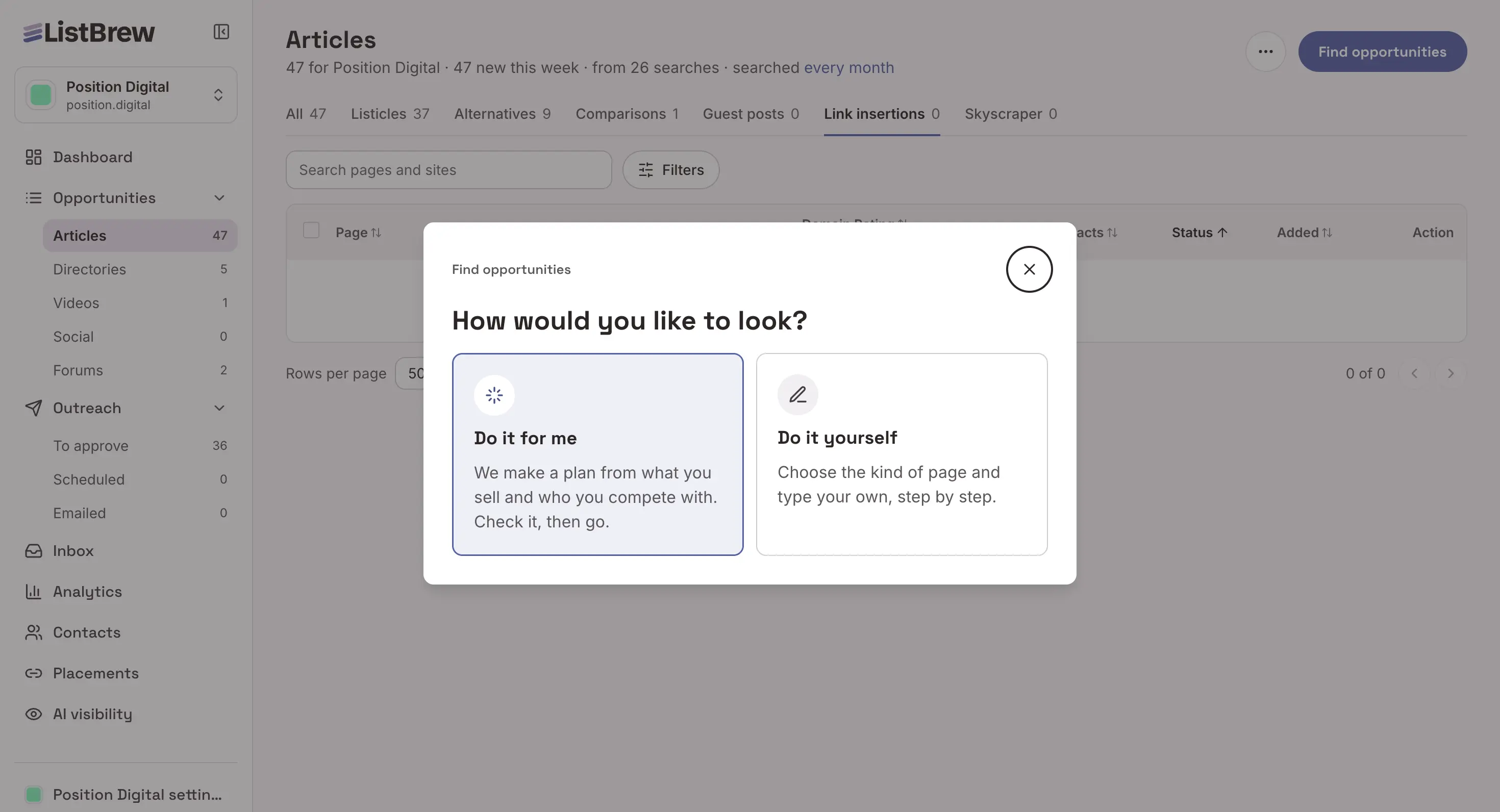
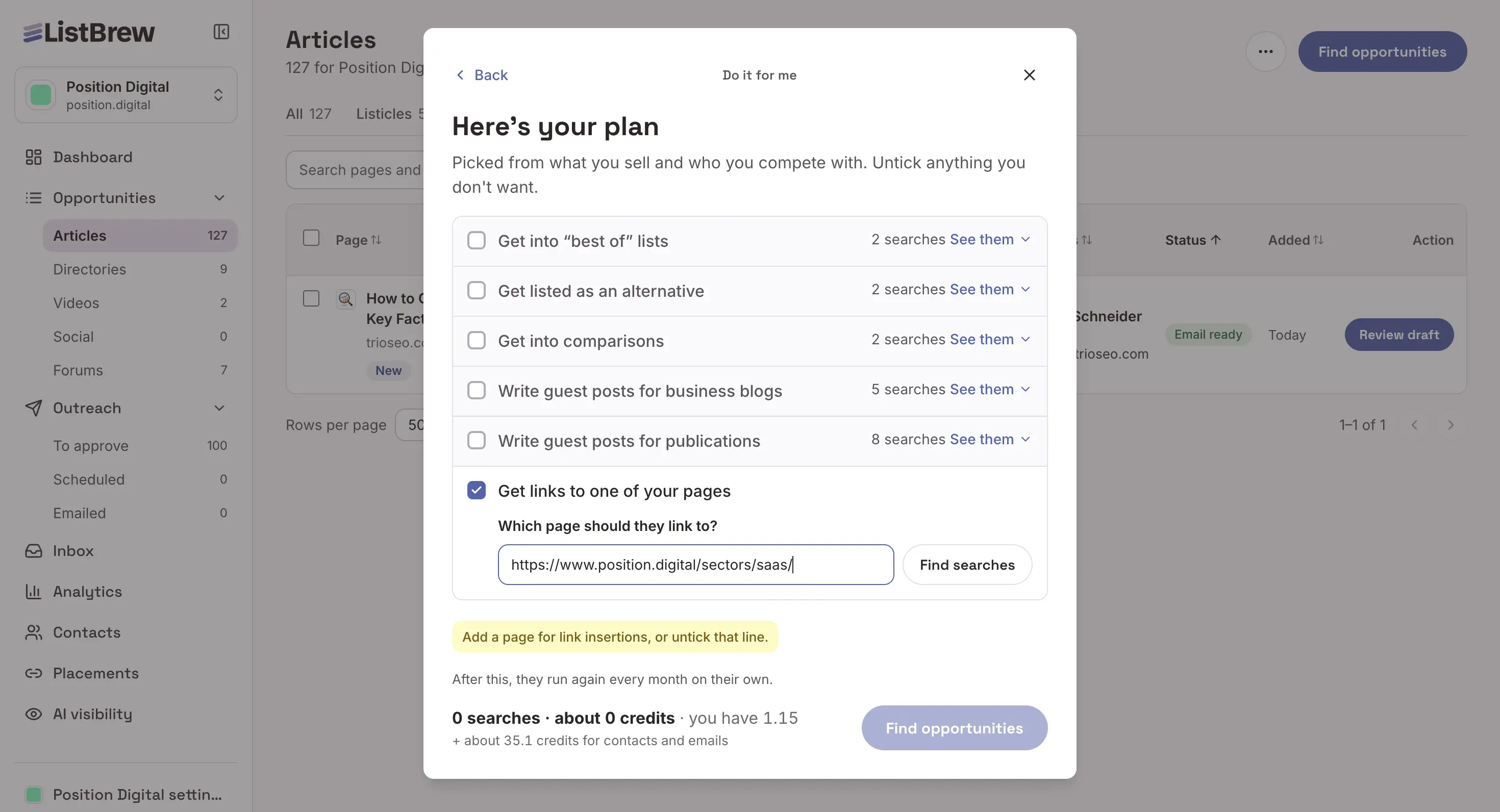
If you choose Do it for me, tick the Get links to one of your pages option, enter the page you want to build links to, then click Find searches. Once finished, click Find opportunities.
If you choose Do it yourself, follow the required steps:
Choose Link insertions.
Enter the page you want to build links to.
Create the outreach email template.
Make sure everything looks good, then start finding opportunities.
Step 3: Review and filter the opportunities
ListBrew then finds existing articles on topics relevant to yours, as well as the contact information for each opportunity.
Review the results, then filter by domain authority, traffic, Google rankings or AI visibility to put the highest-impact pages first. Those filters cover the visibility check in The Host Page Filter, so the other three checks still apply to the pages you keep.
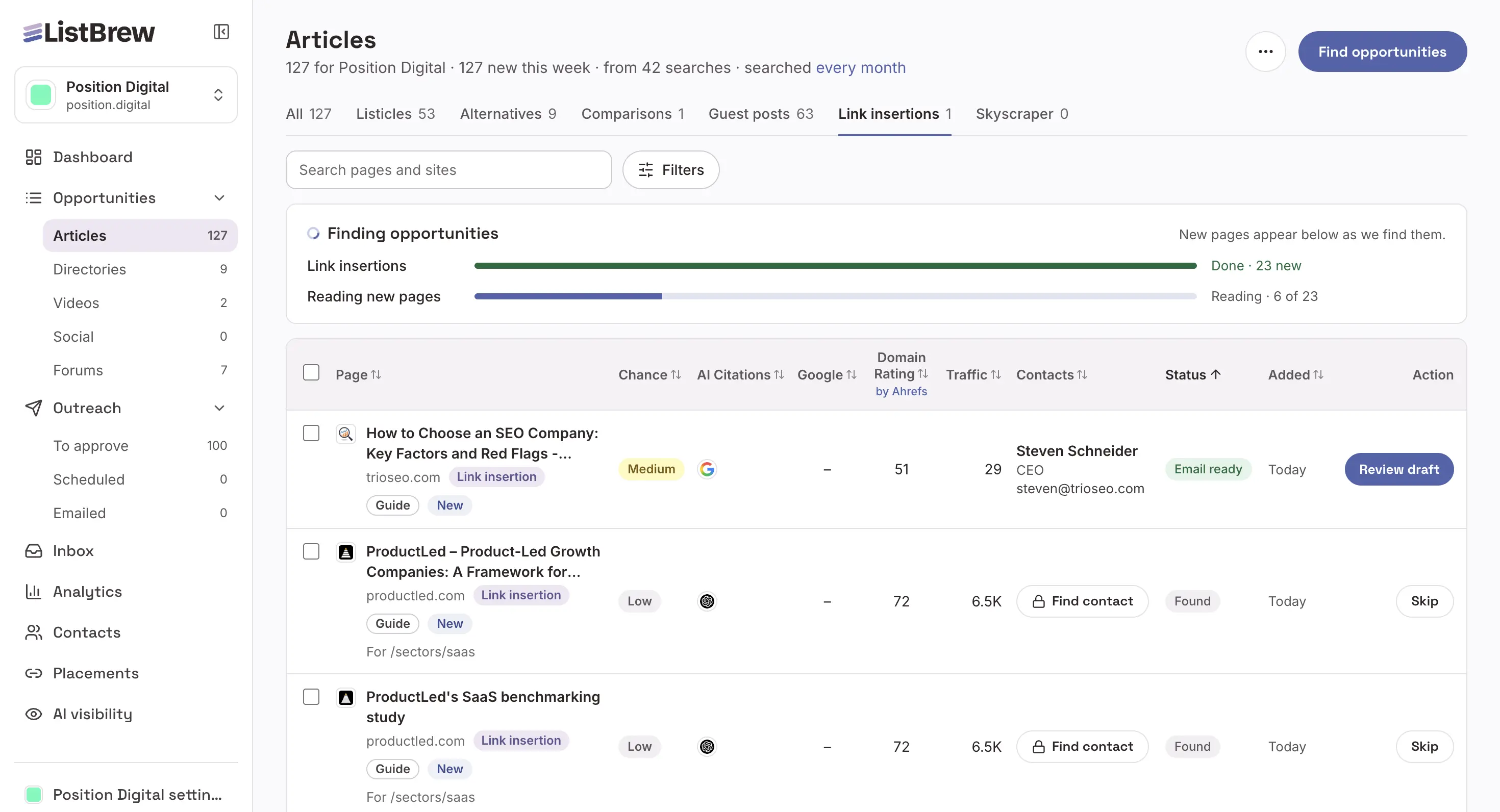
Here's what the outreach team looks for in those results:
We do not target articles that are exactly the same as our client's article. We're targeting articles that have touched maybe a little bit about our client's article but are still relevant to our client's article.
Step 4: Prepare a personalized pitch
Select the opportunities that have contacts and click Write email.
ListBrew will then automatically writes a personalized pitch for each opportunity. Click Review draft to review the draft and make some changes.
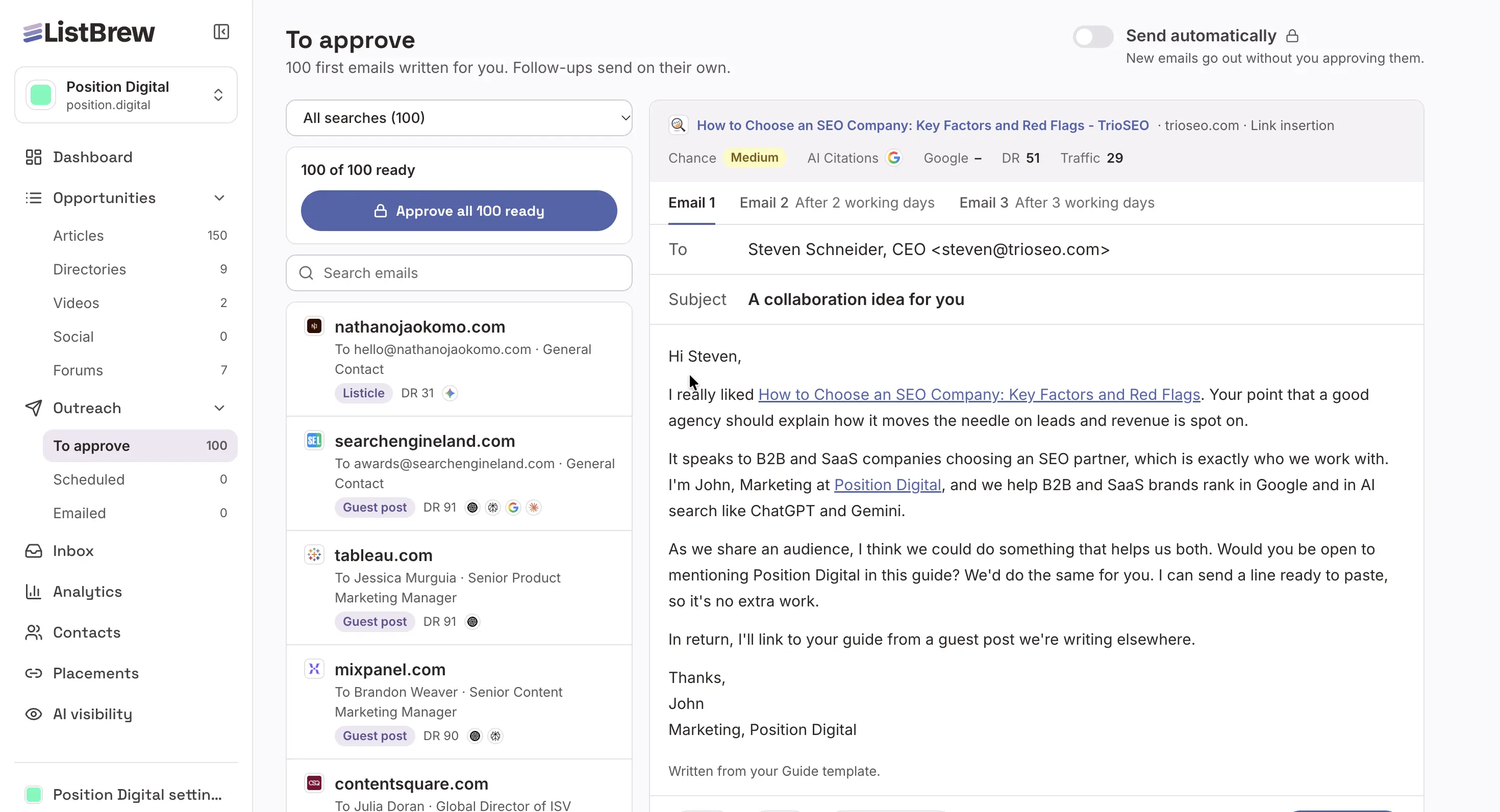
The outreach team personalizes each pitch by analyzing the prospect's article first, then telling the prospect exactly where the addition goes:
We asked Claude to analyze the prospect's article, use Ahrefs to identify its target keyword and then also do a gap analysis where the client's article will be suitable for the prospect's article, to make sure that it's relevant. ... We already specifically tell the prospect where we can insert either a paragraph or our link.
Once you're happy with the outreach message, click Approve.
Step 5: Send the sequence and follow up
Every approved email goes to the Scheduled section under Outreach. Open it and click Send now to start sending your pitches. ListBrew will automatically send the follow-up emails based on the scheduled dates.
For pitch templates and the full walkthrough, read our guide to building backlinks using link insertion.
Start your first link insertion campaign
With ListBrew, you find existing articles where a link to your page fits naturally, filter them by domain authority, traffic, Google rankings or AI visibility, and pull contact details for each one. Then you write the pitch and send the sequence from the same dashboard.
Create your free ListBrew account and start your first link insertion campaign today.
Link insertion FAQ
What is a link insertion?
A link insertion is a link added to an article that's already published on another website, with the site owner's agreement. Vendors often call it a niche edit, and our guide to what link insertion is in SEO covers how it works and its main types.
What is the difference between a link insertion and a guest post?
The difference between a link insertion and a guest post is what gets published. An insertion adds your link to an article already live on the host site, while a guest post is a new article you write for that site. Our comparison of link insertion vs guest post explains when each fits.
What is link placement?
Link placement describes the same mechanic as link insertion and niche edits, a link added to an existing article. Vendors and marketplaces tend to use "link placement" for insertions they sell, so treat a link placement offer as a paid insertion and apply Google's rules on qualified links.
Can you find link insertion sites for free?
You can find link insertion sites for free with Google search operators, plus Check My Links and the Wayback Machine for finding broken links. You can also use ListBrew's free plan, which comes with 50 free credits to spend and needs no credit card.