Link insertions and guest posts are the two most common ways to earn a contextual backlink from another website. A link insertion adds your link to an article that's already published, while a guest post is a new article you write for someone else's site.
Both can work, but which tactic is best suited for your business?
In this guide, I'll compare link insertion vs guest post side by side on effort, control, turnaround time, cost, and SEO value.
I'll also give you a four-question test for choosing your first campaign, drawing on how the outreach team at Position Digital runs both every month.
Key takeaways
Choose link insertions for speed. Add backlinks to relevant, existing articles without creating new content, especially when you already have established pages worth citing.
Choose guest posts for brand awareness. Gain more control over your narrative, demonstrate expertise, and provide context that helps search engines and AI systems understand your brand.
Match your tactic to your website's stage. New websites with few linkable assets should start with guest posts, while established sites with strong content can prioritize link insertions.
Use both tactics for the best results. Combine guest posts to build brand authority with link insertions to earn backlinks to existing content. If resources are limited, alternate between the two campaigns each month.
Personalize every outreach pitch. For guest posts, suggest topics based on the publication's content gaps. For link insertions, show exactly where your resource fits and how it improves the existing article.
Prioritize relevance over link volume. Target relevant websites and articles where your content adds genuine value, rather than pursuing backlinks that feel forced.
Be cautious with paid backlinks. Paid guest posts and link insertions may not deliver SEO value as expected, since Google requires paid links to use
rel="sponsored"ornofollowattributes.
What is a link insertion?
Link insertion, also known as niche edit, is adding your link to a published article on another website. You find an article where your page fills a gap, then ask the editor to add your link, usually with a suggested sentence.
What is a guest post?
A guest post is an article you write for another website, published under your name, with a link back to your site inside it. This is an excellent tactic if you’re running a small website with no linkable page yet.
Link insertion vs guest post at a glance
Link insertion and guest posting are both excellent link building tactics, but they come with their own benefits and drawbacks.
Let’s compare the two in terms of effort, control, turnaround time, cost, and SEO value.
Link insertion | Guest post | |
|---|---|---|
Definition | Adding a backlink to an existing, published article | Publishing a new article on another website with a backlink to your site |
Effort | Low; no new article required | High; requires writing a new article |
Control | Limited control over the surrounding content. Links can feel forced if they don't fit naturally into the existing article | Total control over the narrative, topic, and context in which your brand and link appear |
Turnaround time | Usually faster, depending on publisher approval | Typically takes longer due to writing, editing, and publication |
Average cost | $179–$225 | $295–$461 |
SEO value | Lets you target a page that already ranks in Google, gets cited in AI answers, and drives thousands of visitors | Helps establish expertise and associate your brand with relevant topics, giving AI engines more contextual information to draw on when describing your brand |
Works best when | Your page fills a gap in someone else's article | You want a byline and control over the topic |
Which tactic should you choose? 4 questions to help you decide
Answer these yes-or-no questions about your website, content, and outreach capacity to decide which link-building campaign to prioritize:
Do you have a page worth citing? Think original research, a free tool, proprietary data or a definitive guide.
Is your domain established? Does it already earn backlinks and rank for some of its target keywords?
Do you also want to build brand awareness and expertise besides building links?
Can your team run two outreach campaigns a month, each with its own prospect list?
Your answers to the first two questions determine where to start. The last two help you decide whether to add a second campaign.
Your situation | Where to start | Why |
|---|---|---|
You lack linkable content or an established domain | Guest posts | Publish useful content on relevant websites while building your site's authority and content library |
You have linkable content and an established domain | Link insertions | Sites are more willing to link to your content if it’s relevant and useful |
You want both backlinks and greater brand exposure, and have enough resources | Run both concurrently | Use guest posts to build expertise and control your brand narrative, and link insertions to earn relevant links to existing assets |
You want both backlinks and greater brand exposure, but have limited capacity | Run both on a rotating schedule | Dedicate two weeks a month to link insertions and the other two to guest post outreach, keeping each campaign focused and manageable. |
New site with few linkable pages? Start with guest posts
If your website is new or you don't yet have content worth citing, start with guest posting. You can contribute useful articles to relevant publications, demonstrate your expertise and introduce your brand to new audiences while developing linkable assets of your own.
Guest posts also give you more control over the narrative. You can explain what your brand does, showcase your expertise and provide context that helps search engines and AI systems understand your relevance to a topic.
Start with our guide to guest post outreach to plan your campaign, then use these guest post outreach email templates to start pitching relevant publications.
What if you already have a strong page on a young domain? You don't necessarily have to wait. If your page offers something genuinely useful to an editor's audience, you can pitch it for link insertions even if your domain is relatively new.
However, guest posting may still be the better first priority if you also need to build brand awareness and establish your presence in the industry first.
Established site with strong content? Start with link insertions
If your domain already earns backlinks and ranks for relevant keywords, and you have pages worth citing, link insertion is a natural starting point.
Rather than creating a new article, you approach editors who have already published content related to your target page. Your job is to explain why adding your resource would improve their article and help their readers.
To improve your chances of securing a placement:
Target relevant articles. Look for pages that cover your topic and could benefit from referencing your resource.
Prioritize pages with existing visibility. Articles that rank and attract organic traffic may offer more opportunities for referral visits.
Personalize every pitch. Explain how your page complements the article and where the link would fit naturally.
Suggest a specific addition. Give the editor a sentence or short paragraph they can use or adapt, rather than simply asking for a backlink.
Our guide on how to build backlinks using link insertion covers the full steps.
Have capacity for both? Run two campaigns
If you have the resources to manage separate prospect lists, you don't necessarily have to choose one tactic over the other.
Christine Altiche, SEO Specialist at Position Digital, explains that the team runs both campaigns as part of its regular outreach schedule:
“We don't really choose between the two. We always do both. It's more of a schedule.”
The team typically sends guest post outreach in the first week of the month, followed by link insertion outreach in the second or third week. This allows them to build brand authority through guest contributions while earning links to existing client content through insertions.
If you're working with a smaller team, you can adopt the same approach by dedicating separate weeks to each campaign rather than trying to manage both simultaneously.
Christine also suggests planning both campaigns around a shared monthly theme to make things easier.
“For example, our theme for October is SaaS. So for that month, we’ll pitch SaaS publications for guest posts while building links to existing SaaS articles through link insertions.”
You can find more details in our guide to building backlinks with link insertion.
The important thing is to keep the prospect lists, pitches and goals distinct. A guest post pitch needs to sell an article idea; a link insertion pitch needs to demonstrate why an existing resource belongs in a published article.
How to run link insertion and guest post campaigns in ListBrew
ListBrew helps you manage both campaign types, from finding relevant opportunities and contact details to creating personalized pitches with AI and automating outreach sequences with follow-ups.
The setup process is similar for both campaigns, with the main difference being the type of opportunities you're looking for:
Create a campaign. Choose Link Insertion or Guest Post as your campaign type.
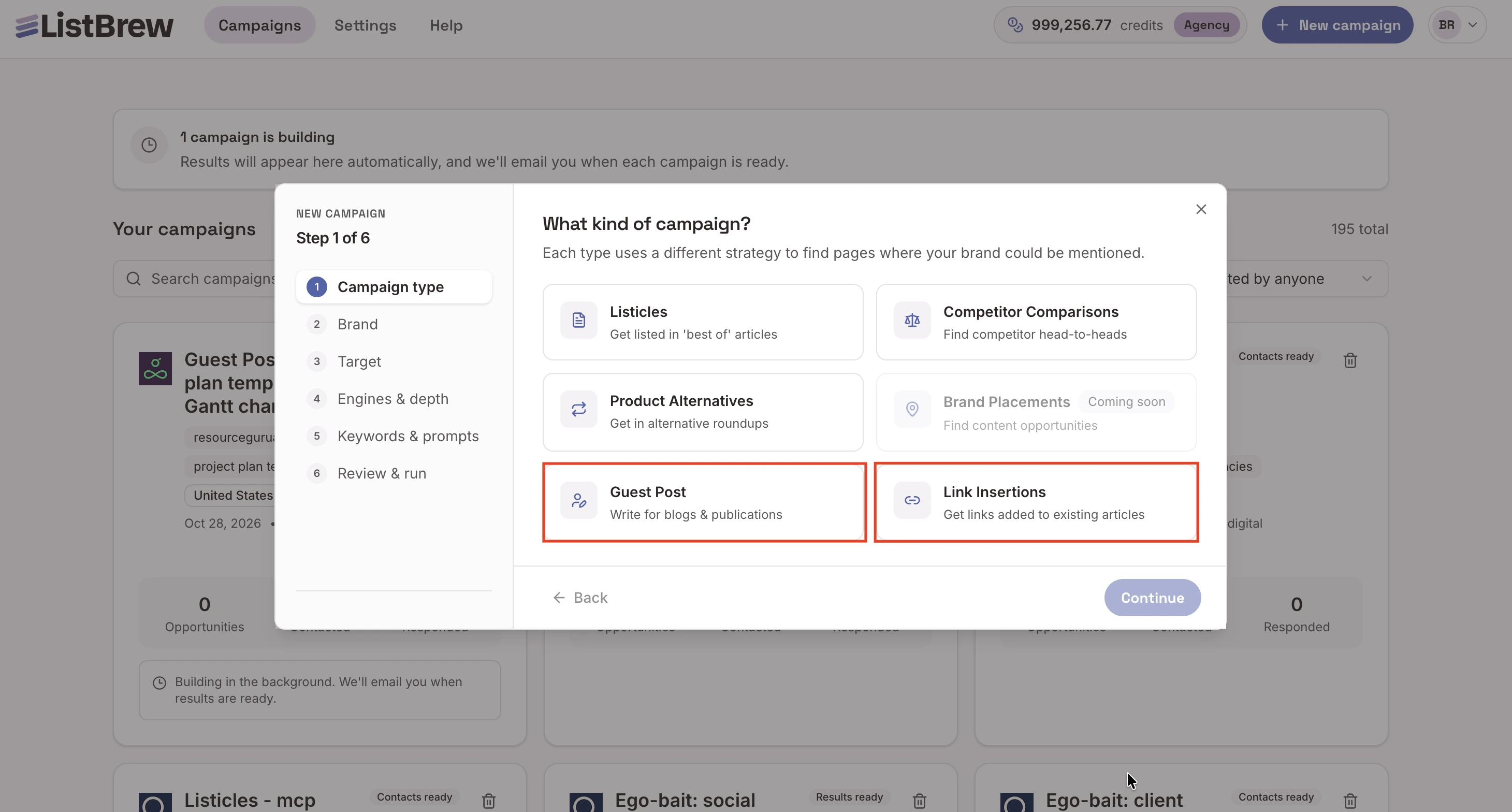
Find relevant opportunities. If you choose Link Insertion, add the page you want to build links to. If you choose Guest Post, choose the types of publications you want to target. ListBrew will find matching articles or potential guest post opportunities.
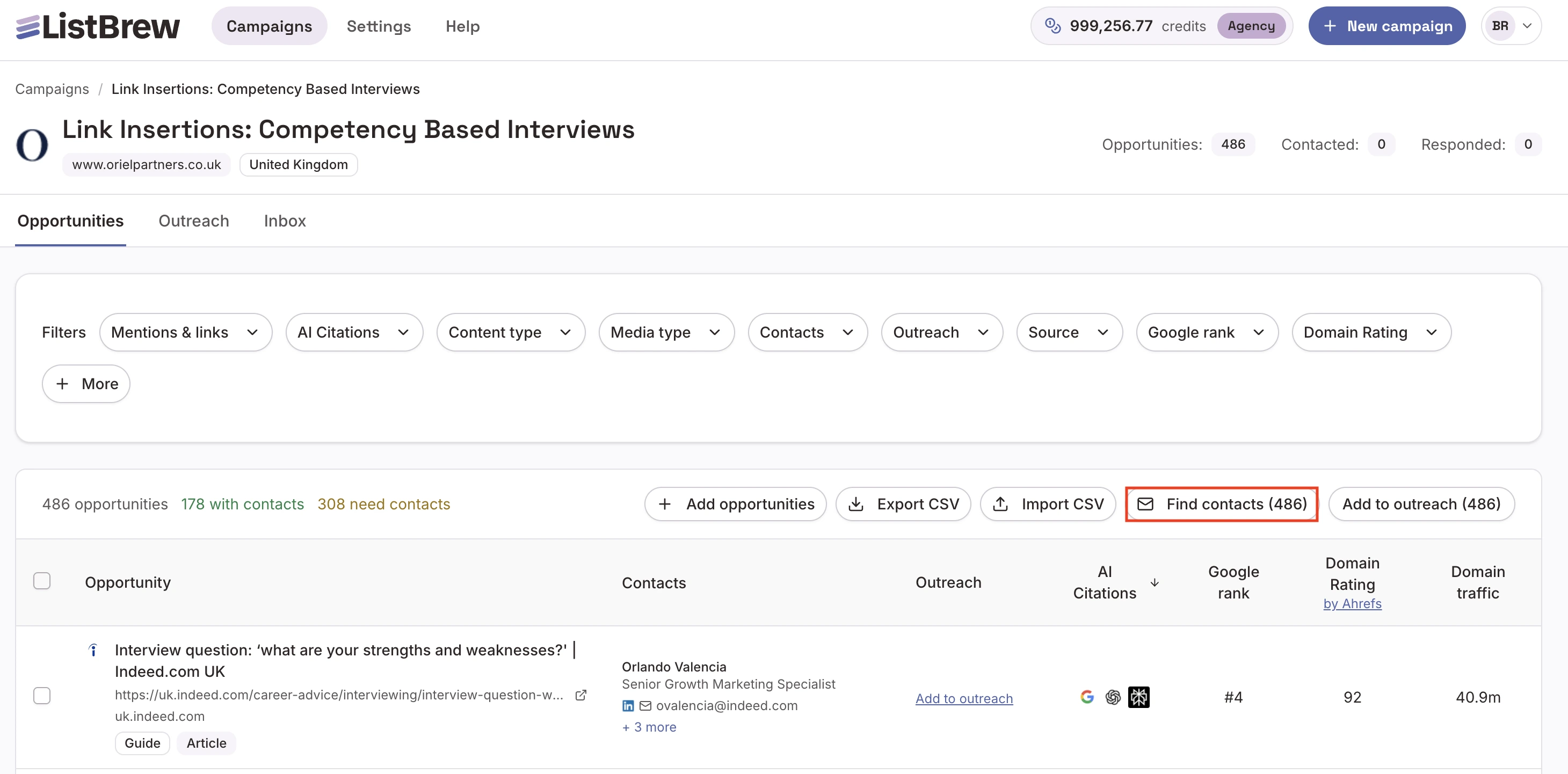
Find the right contacts. Click Find contacts to retrieve names, job titles, and email addresses through Hunter.io and Apollo.
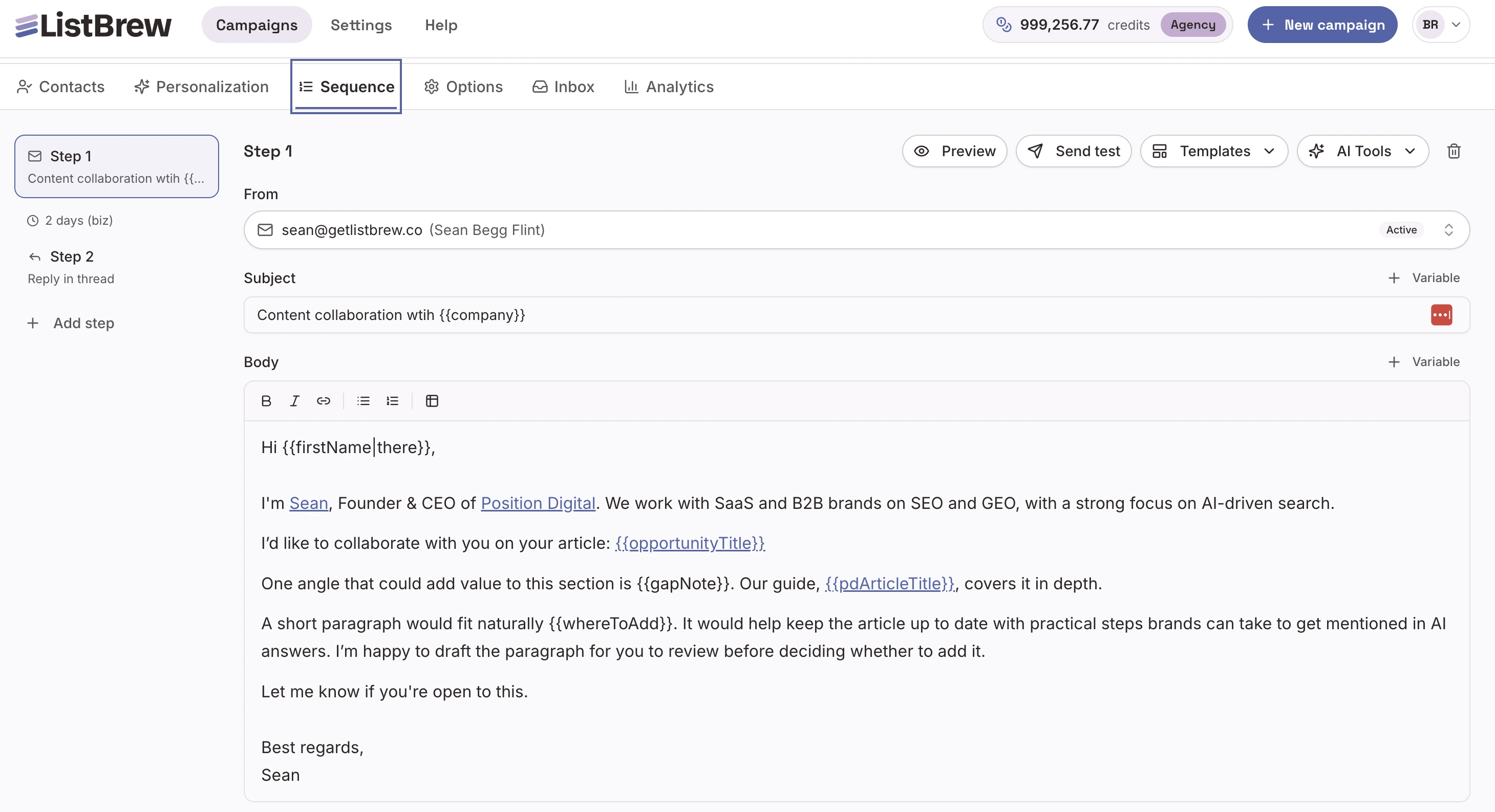
Personalize your pitches. Add suitable opportunities to Outreach and use AI to draft pitches tailored to each prospect and campaign type.
Set up your outreach sequence. Configure your emails and follow-ups, then launch your campaign.
If you're running both tactics, create a separate campaign for each one. This keeps your prospect lists organised, lets you tailor your messaging to the opportunity, and makes it easier to track performance independently.
How to personalize your pitch and boost reply rate
To increase your reply rate, keep these best practices in mind when doing your outreach:
For guest posts, start with the prospect's content gaps
Rather than sending the same article ideas to every website, analyze what each prospect's competitors rank for and identify relevant topics the prospect could cover.
As Christine explains:
“We no longer have uniform topic ideas for all prospects. The topics we pitch are tailored to the prospect and their audience.”
This makes the pitch more valuable to the recipient. You're offering to contribute an article that could help them cover a relevant topic, rather than asking them to publish a generic guest post for the sake of a backlink.
For link insertions, show exactly where your content fits
Analyze the target article, identify its target keyword, and find a genuine content gap your page can fill. Then suggest a specific paragraph or link placement that would improve the article.
Christine uses this approach to make each pitch more relevant:
“We already tell the prospect specifically where we can insert either a paragraph or a link.”
That small detail makes the request easier to evaluate. The editor can see how your content fits into their article and decide whether it adds value to their readers.
In both cases, the principle is the same: don't just ask for a link. Show the prospect why the collaboration makes sense for their website.
Kickstart your campaign with ListBrew
Whether you want to run a link insertion or a guest post campaign, or both, ListBrew makes the whole process easy. It finds relevant opportunities for your campaign and lets you filter by Google rank and AI visibility, so you can prioritize prospects that really move the needle.
After that, you can also find the contact information for each opportunity and send personalized pitches, all in one dashboard. Create your free account today and get 50 free credits to launch your first campaign!
Link insertion vs guest post FAQ
What is link insertion in guest posting?
Link insertion in guest posting means adding a new link to a guest post that's already live, as opposed to an article the host wrote itself. The host still decides whether the link fits. If it's your own post, I'd ask the editor who published it, since you've already got a working relationship.
Do niche edits work in SEO?
Niche edits work in SEO when the link is earned, meaning the editor adds it to a relevant page because it improves that page. A page that already ranks and gets traffic is the best target. A paid niche edit is different: Google's spam policy requires rel="sponsored" or nofollow on it, and that attribute blocks ranking credit.
Are link insertions better because the page already has authority?
Link insertions on pages that already have authority might carry more SEO value. However, if the link is forced, then both Google and readers will notice, which can backfire.
Does guest posting still work?
Yes, it’s still a great tactic to earn high-quality and relevant links. In Editorial.Link's 2026 vendor survey of 518 SEOs, 16% picked guest posting as the second most effective tactic, behind digital PR at 48.6%.
Are paid guest posts and link insertions worth it?
Paid guest posts and link insertions are rarely worth it if rankings are the goal. Google requires rel="sponsored" or nofollow on paid links, which blocks ranking credit. Quality is thin too. Only 1.37% of guest post sellers and 0.34% of insertion sellers make BuzzStream's top two quality tiers, in the vendor's own data.